An architectural diagram is a simplified drawing that explains one idea about a building: where the sun comes from, how people move, how the spaces stack up or how the thing gets built. Plans, sections and elevations describe what a building is. Diagrams explain why it is that way, which is usually the question a studio tutor, a jury or a client is really asking.
The best diagrams leave almost everything out: a few lines, one or two colours and a clear label. For scale and life, our free architectural cutouts give you people and trees to drop straight in. Below are 15 architectural diagram styles, each with a real example from a built project and notes on what it shows, when to use it and how to make your own. If you are building a full presentation set, this guide pairs with our posts on axonometric drawing styles, section drawing styles and elevation drawing styles.
1. The Concept Sketch Diagram
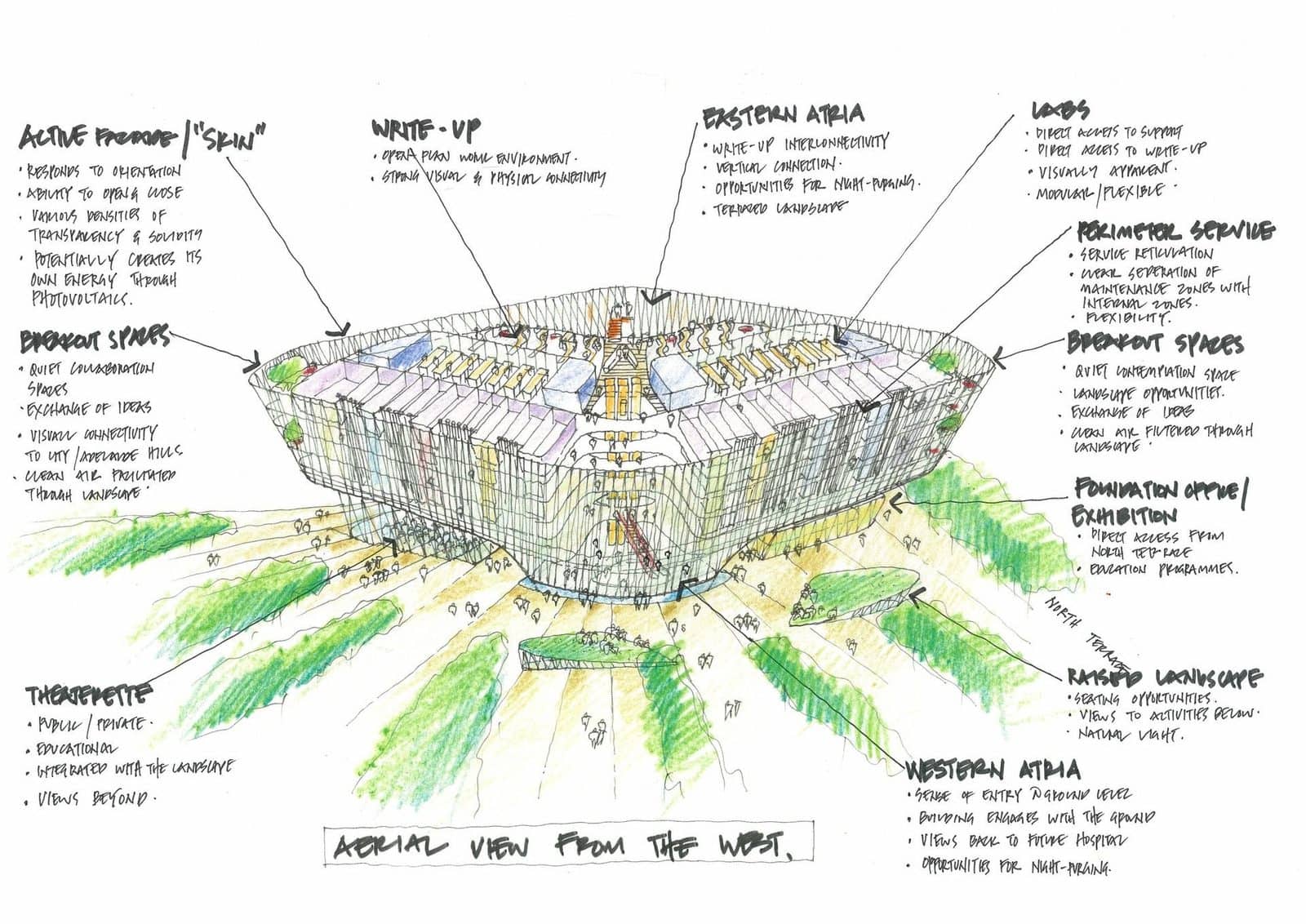
Before the South Australian Health and Medical Research Institute opened in Adelaide in 2013, Woods Bagot explained it with a loose aerial sketch. Green landscape fingers run towards the base, and handwritten notes point to the active facade, the atria, the labs and the raised landscape. It reads in seconds and feels open to discussion rather than fixed.
- What it shows: The big idea and the few moves that support it, in the designer’s own hand.
- When to use it: Early design reviews, the first board of a presentation, or any time you want feedback on an idea rather than a finish.
- Tip: Sketch over a quick 3D model screenshot so the proportions are right, then keep your notes to short phrases with leader lines.
2. The Massing Strategy Diagram
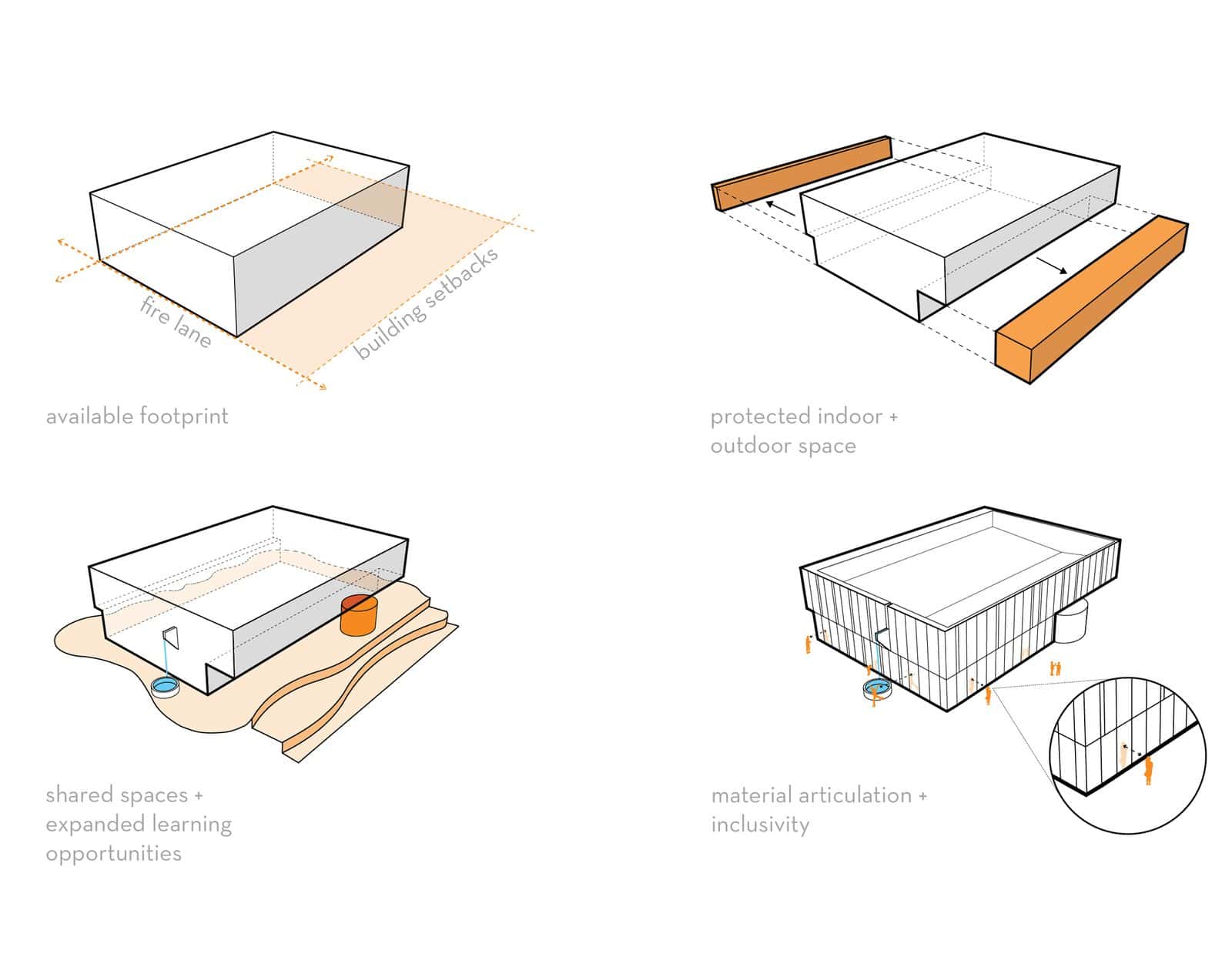
LPA’s 2017 Maker and Fitness buildings at Tarbut V’Torah, a K-12 school in Irvine, California, are explained in four small white models: the available footprint between fire lane and setbacks, protected indoor and outdoor space, shared learning spaces cut into the block, and finally the facade. Each step adds one idea and one caption.
- What it shows: How a building’s form grew from the site’s limits through a series of design moves.
- When to use it: Whenever you need to justify a shape. It is the standard answer to a jury that asks “why does it look like that?”
- Tip: Keep the camera angle, line weight and scale identical in every frame, and limit each step to one change in one accent colour.
3. The Programme Zoning (Bubble) Diagram
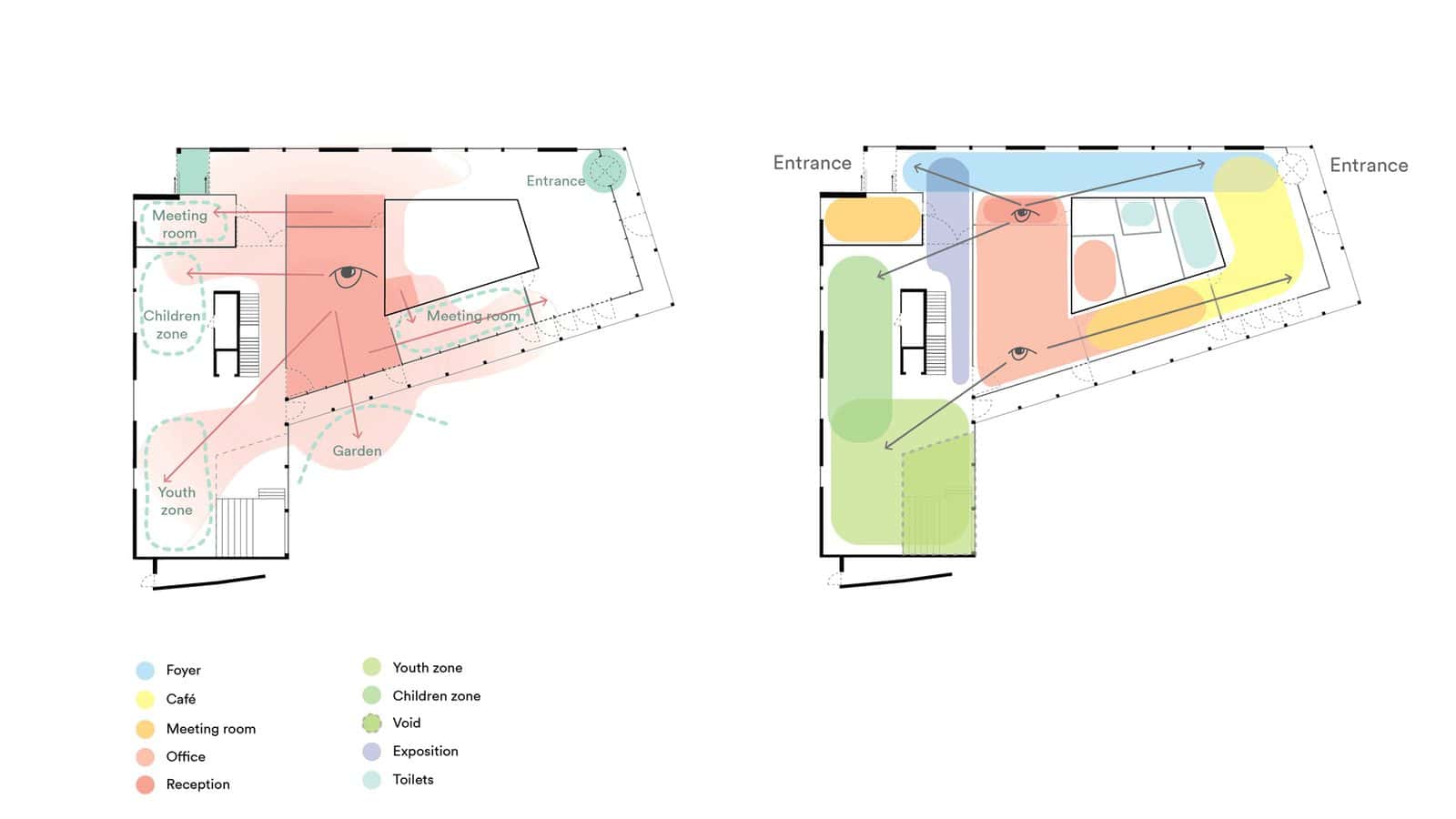
Marc Koehler Architects’ timber community centre and library in Edegem, Belgium (2021) lays soft, blurred colour fields over the plan instead of hard-edged rooms: foyer, café, meeting rooms, youth and children’s zones. On the left, the reception desk sits at the centre of a fan of sightlines, showing how staff can watch the whole floor.
- What it shows: Which activities sit where, how big they are, and which ones need to be next to each other.
- When to use it: Briefing and early planning, and as a quick read of a finished plan. It pairs well with the plan graphics in our guide to floor plan graphic styles.
- Tip: Use soft edges or rounded blobs for zones so they read as uses, not walls, and put the legend right beside the drawing.
4. The Stacked Programme Axonometric
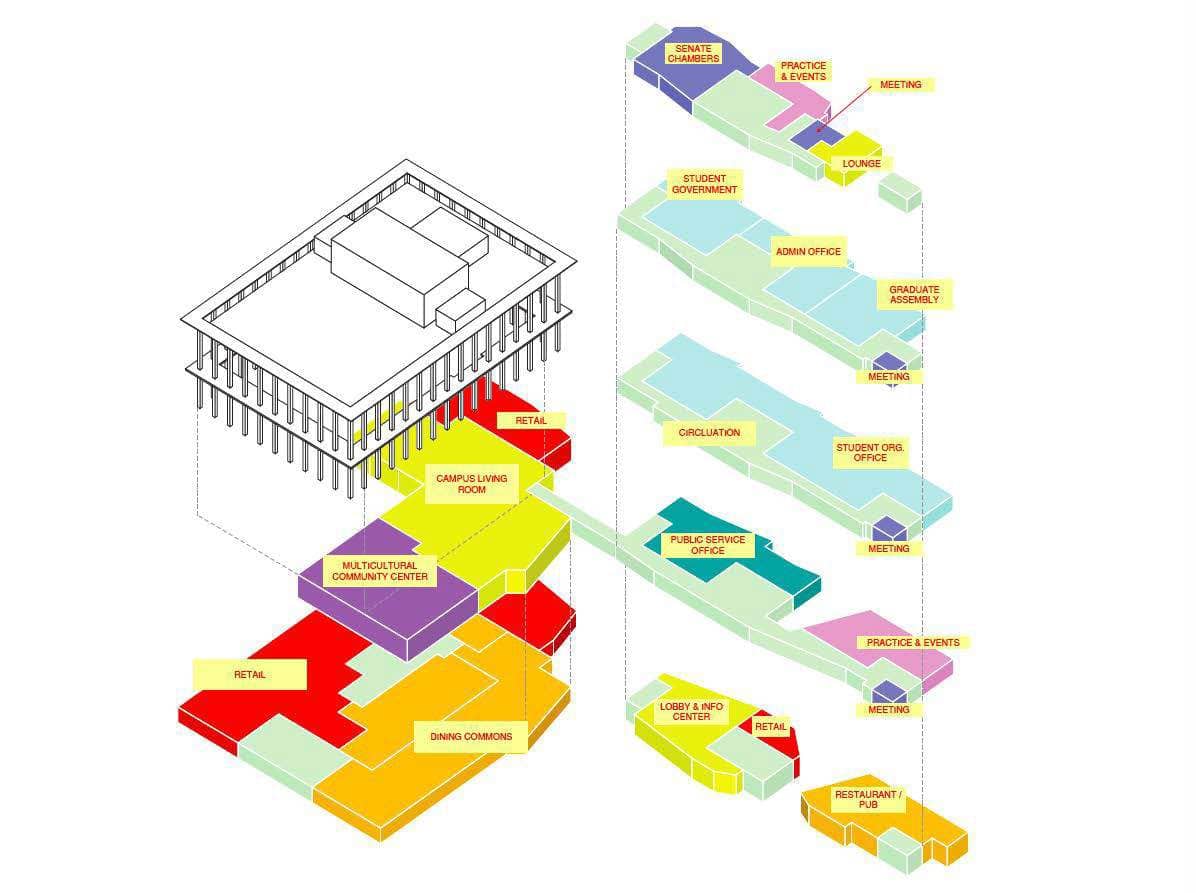
For the 2015 Lower Sproul Redevelopment at UC Berkeley, Moore Ruble Yudell pulled each floor out of the building and floated it beside a line drawing of the structure. Flat, bright colours mark retail, the dining commons, the multicultural centre, student government and meeting rooms, so a complex student hub makes sense at a glance.
- What it shows: How different uses stack vertically and which floors share a programme.
- When to use it: Multi-storey and mixed-use buildings where a single plan cannot show the whole picture.
- Tip: Draw the building in thin grey line and save colour for the programme blocks. Dashed vertical lines from each floor back to the building help the reader re-assemble the stack.
5. The Exploded Key Moves Diagram
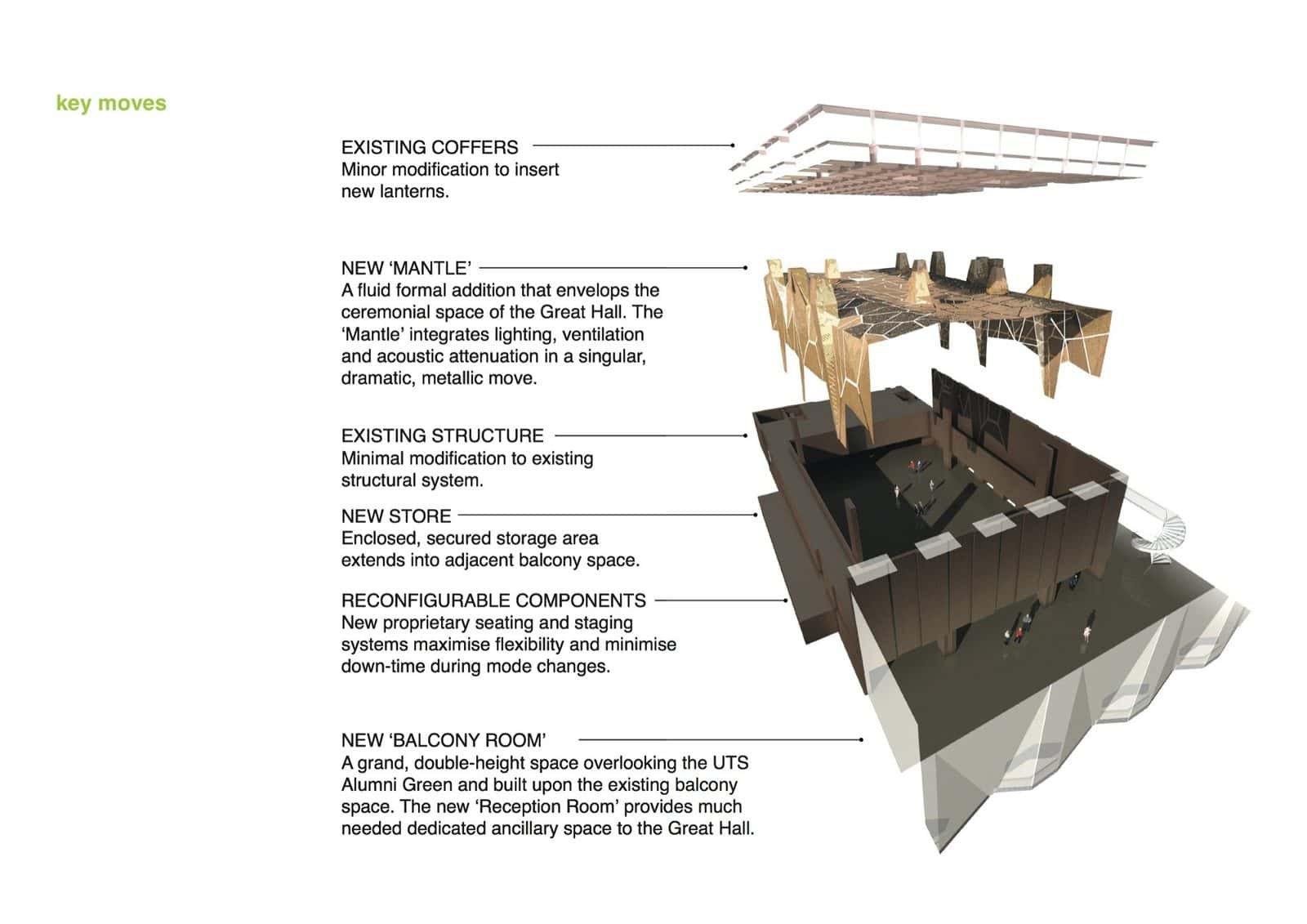
DRAW’s 2011 refit of the Great Hall at the University of Technology Sydney is shown as a vertical stack of parts: the existing coffered ceiling, a new metallic “mantle” carrying lighting, ventilation and acoustics, the existing structure, a new store, reconfigurable seating and a new balcony room. Each layer gets a bold heading and one line of text.
- What it shows: The separate parts of a project and what each one does, especially old versus new in an adaptive reuse project.
- When to use it: Refurbishments and interiors, where the layers of work matter more than the overall form. See also our axonometric drawing guide.
- Tip: Explode along one axis only, keep the gaps between layers even, and line up all the labels in one tidy column.
6. The Circulation Diagram
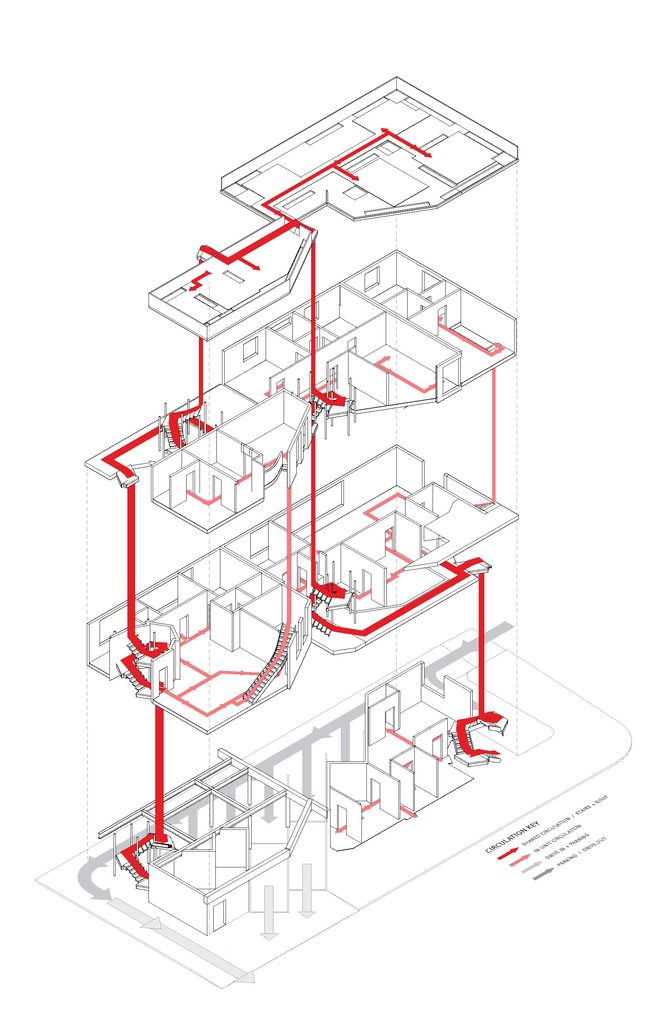
This student and family housing scheme by Theo Janeway pulls every floor apart so you can follow each route through the building. Solid red arrows trace the shared stairs and corridors, lighter red marks circulation inside each unit, and grey arrows show how people and cars arrive from the street. A simple key in the corner ties it together, so the whole movement strategy reads in seconds.
- What it shows: How people move through a building, where routes meet, and which spaces act as hubs.
- When to use it: Schools, hospitals, galleries, stations and any building where the route through it is part of the design.
- Tip: Use one heavy line for the main route and thin dashed lines for secondary ones. A soft blur or glow makes the path read above the plan underneath.
7. The Site Analysis Diagram
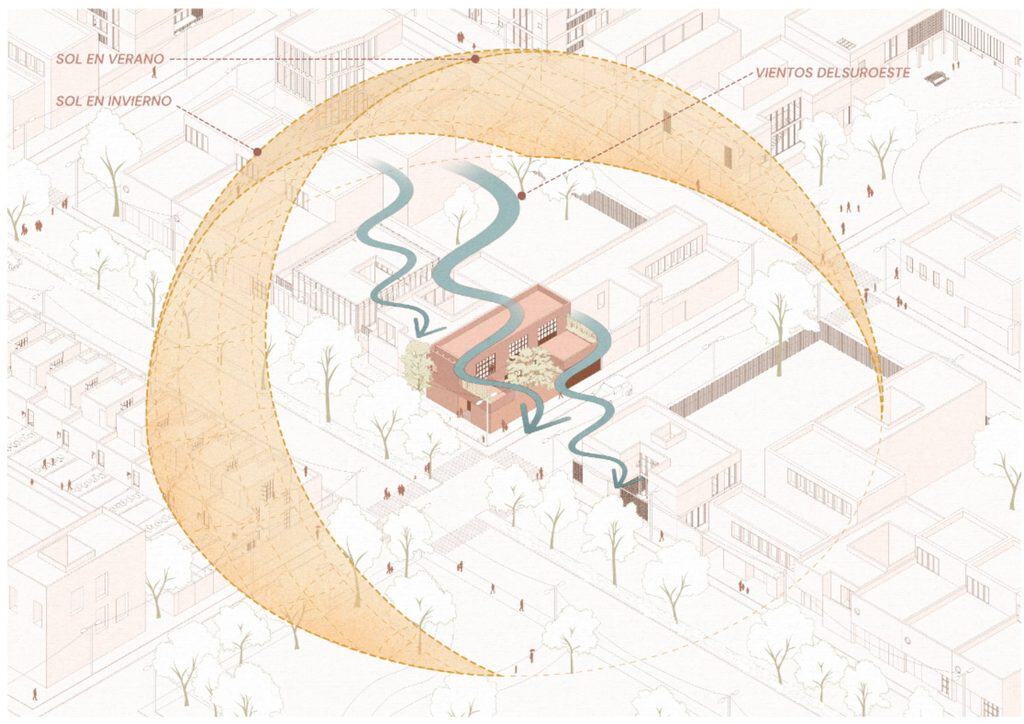
This axonometric site analysis by @estefaniaquevedom keeps the surrounding streets in soft, pale linework so the site forces can do the talking. Two golden arcs sweep over the building to show the summer and winter sun paths, and wavy teal arrows track the south-west winds as they move through the block. The building itself is the only solid colour, so your eye lands straight on it.
- What it shows: Sun, wind, views, noise, access, trees and neighbours: the forces acting on a site before design starts.
- When to use it: The start of every project and the opening board of most presentations. Our guide to site plan architecture covers the drawing that sits beside it.
- Tip: Give each force its own symbol and colour (yellow for sun, blue for wind, red for noise) and add a small key in a corner.
8. The Figure-Ground Context Diagram
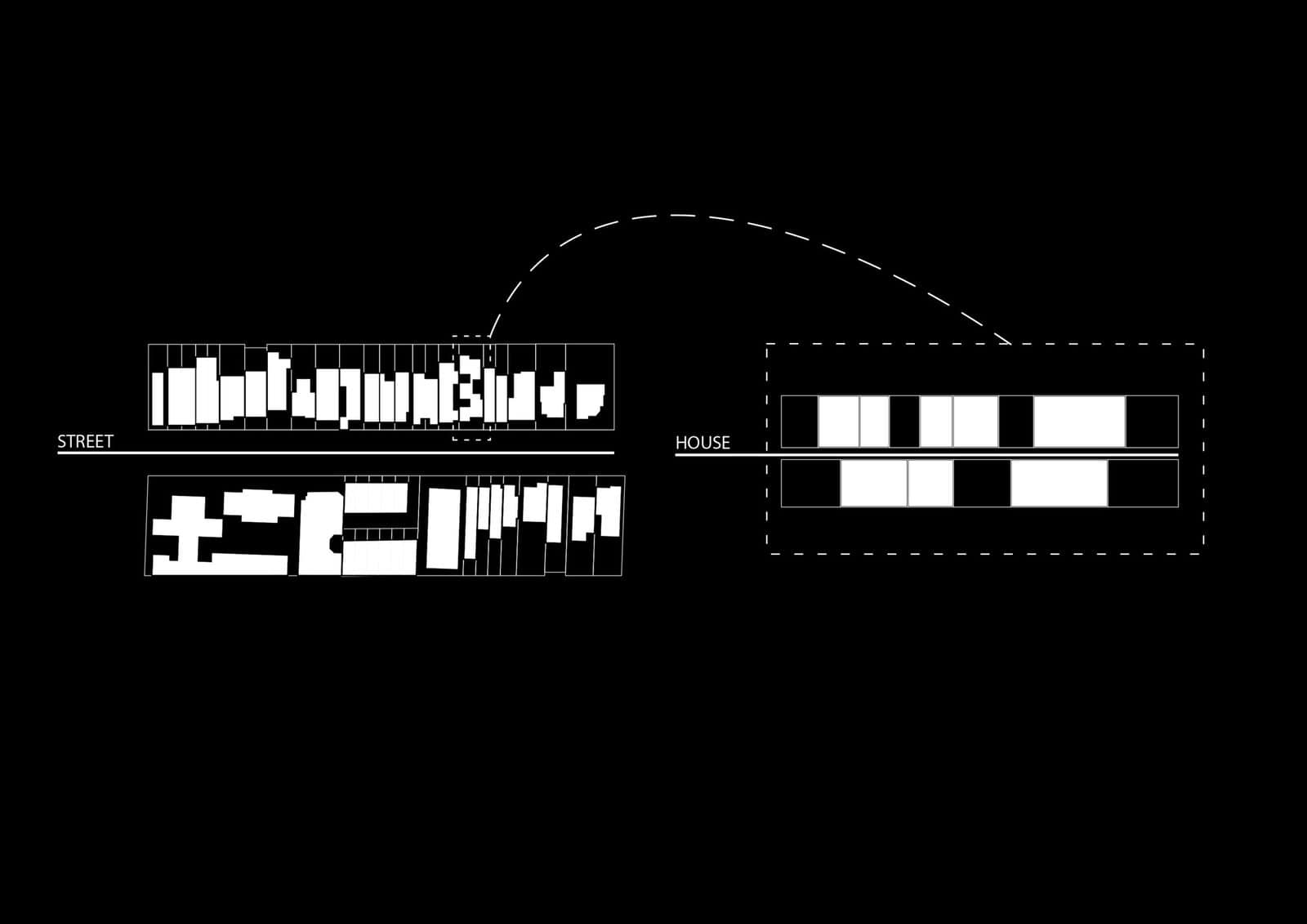
For House in House, a 2014 new build in a heritage street in Fitzroy North, Melbourne, Steffen Welsch Architects drew the street as white footprints on a black ground. A dashed arc lifts one lot out and shows the house as the same rhythm of solid and void: it follows the grain of its Federation-era neighbours without copying them.
- What it shows: The pattern of buildings and open space around a site, and how a project fits into that grain.
- When to use it: Infill projects, heritage streets and urban design work, where fitting in (or deliberately standing out) is the main argument.
- Tip: Use pure black and white with no grey. Invert the colours (white buildings on black) for a more graphic, poster-like result.
9. The Solar Study Diagram
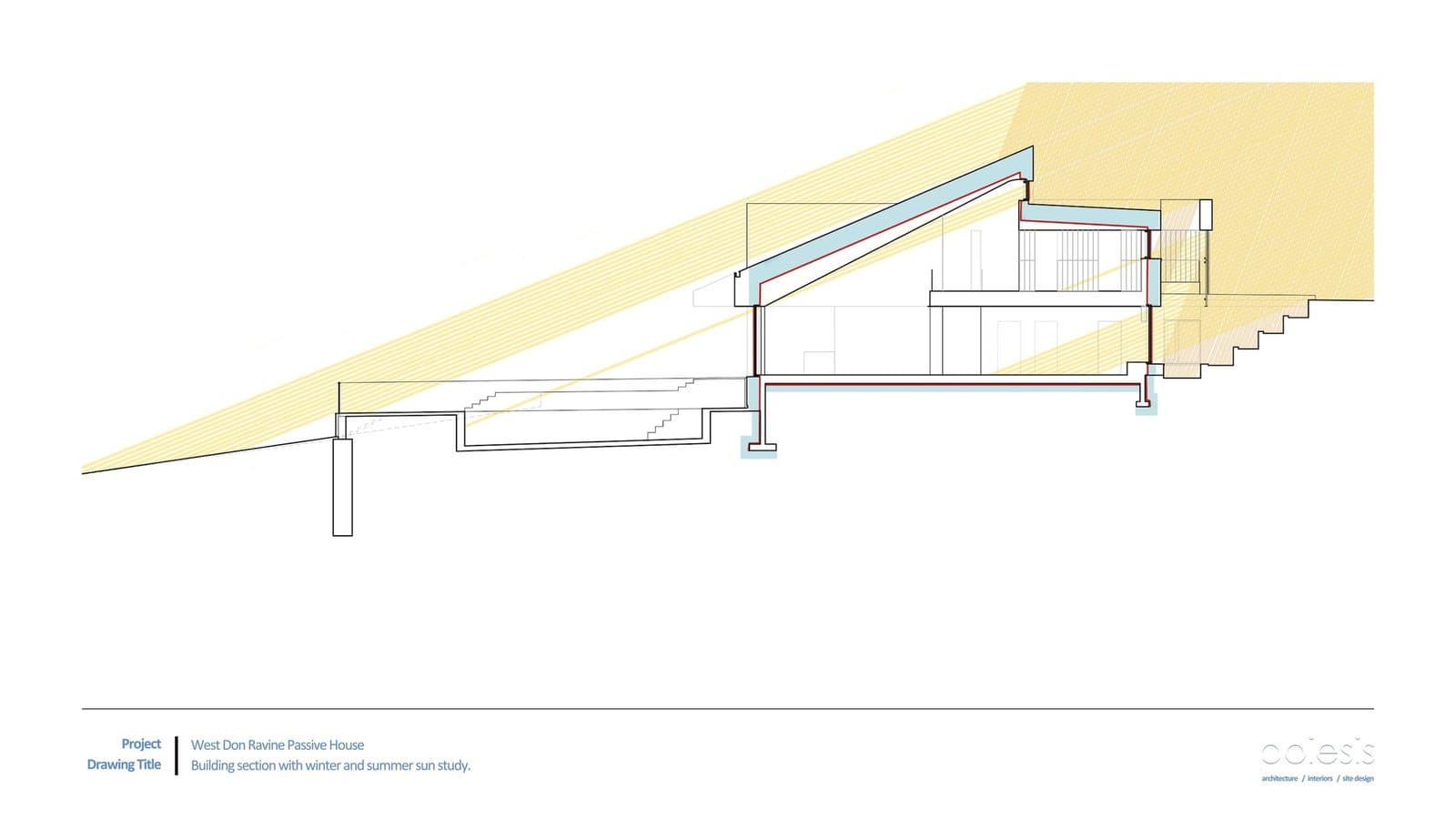
Poiesis Architecture’s West Don Ravine Passive House (2022) was the first house in Toronto certified under the PHIUS passive house standard. Its solar study is a plain section with two pale yellow wedges: low winter sun reaching deep inside, high summer sun cut off by the roof overhang. Nothing else is coloured.
- What it shows: Sun angles at key times of year and how glazing, overhangs and shading respond to them.
- When to use it: Passive design, shading studies and any sustainability argument. In Australia, remember that the winter sun comes from the north.
- Tip: Plot real sun angles for your latitude on the solstices, then fill the wedges with a transparent colour so the section shows through.
10. The Ventilation Diagram
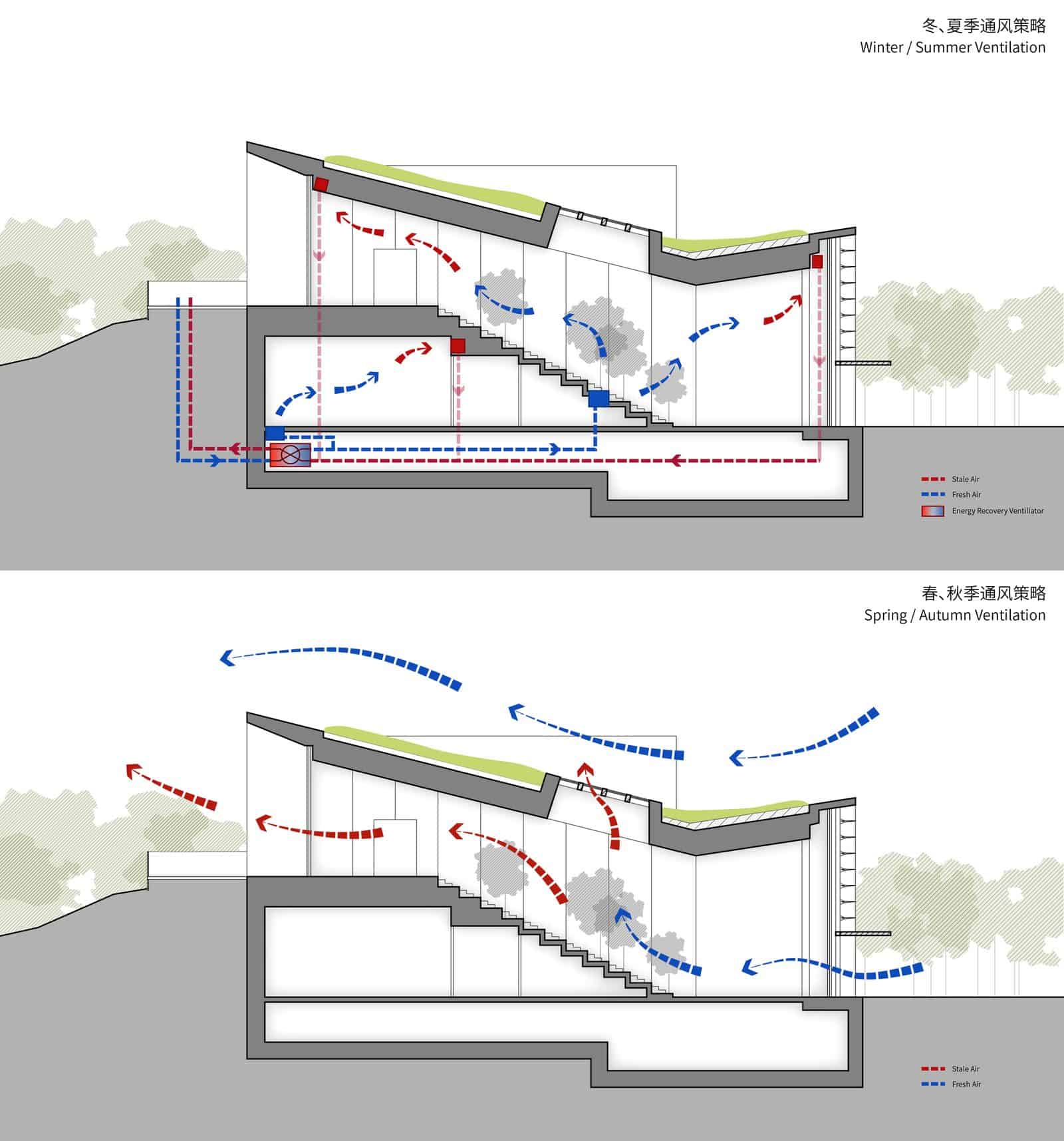
SUP Atelier’s 2017 passive house pavilion in Gaobeidian, China, compares seasons in two sections. In winter and summer (top), the building stays sealed and an energy recovery ventilator swaps stale air, in dashed red, for fresh air, in dashed blue. In spring and autumn (bottom), windows open: fresh air drifts in low, rises through the stepped interior and leaves through high roof openings.
- What it shows: How air enters, moves through and leaves a building, including stack effect and cross-ventilation.
- When to use it: Climate-responsive design, deep plans and atria. The mirrored cone at Foster + Partners’ Reichstag in Berlin, which draws stale air out of the chamber, is a classic subject.
- Tip: Work on a section, use blue for fresh air and red for stale air, and let the arrows curve and rise the way air really moves. A good section drawing makes this much easier.
11. The Sustainability Cutaway Diagram
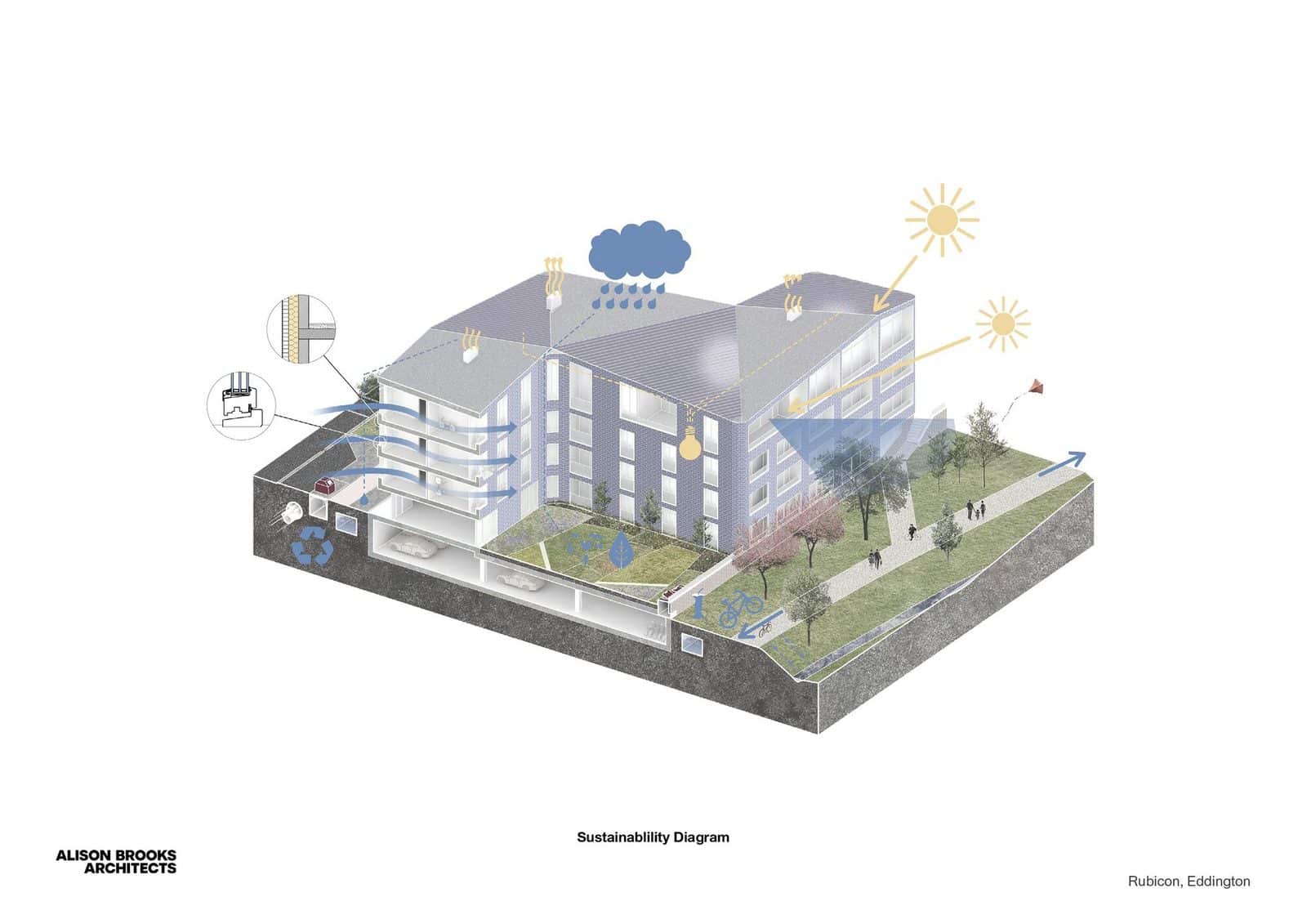
Alison Brooks Architects’ Rubicon housing in Eddington, Cambridge (2025) is explained in one pale cutaway. A sun, a rain cloud, airflow arrows and small detail bubbles call out environmental features such as solar gain, airflow, rainwater and planted roofs. The building stays soft grey and blue, so the icons stand out without the image feeling busy.
- What it shows: Several environmental systems at once, set within the actual building and landscape.
- When to use it: Final presentations and competition boards, where you need one image that sums up a building’s performance. Greener towers such as Bosco Verticale in Milan are often explained the same way.
- Tip: Choose four to six systems at most, give each a simple icon, and fade the building back to 30 to 50 per cent opacity.
12. The Water Flow Diagram
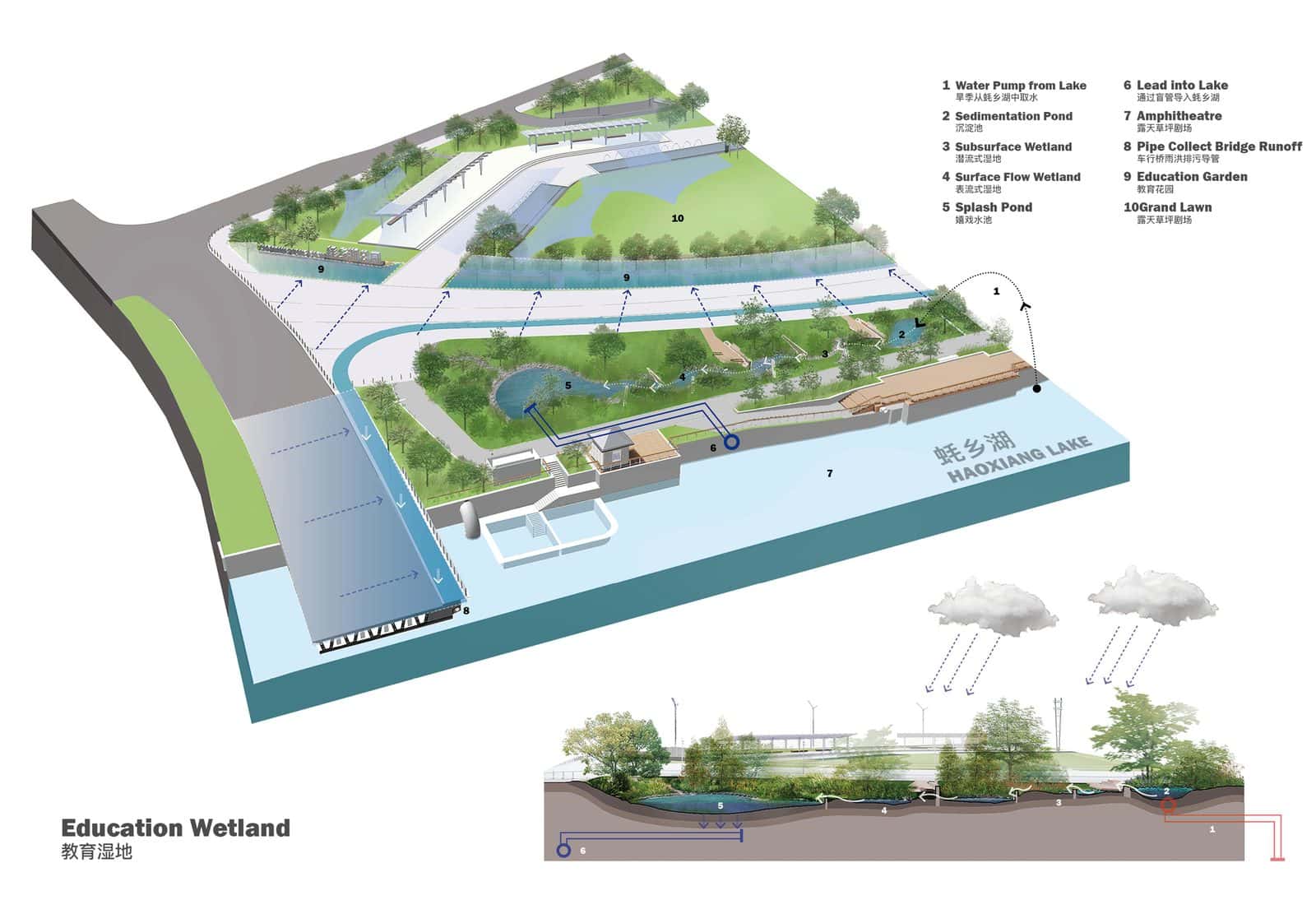
eLandscript Studio drew the education wetland at Haoxiang Lake Park, Shenzhen (2021) as a lush aerial axonometric. Blue dashed arrows trace water from a lake pump through a sedimentation pond, wetlands and a splash pond, then back to the lake. A long section beneath, with rain clouds overhead, shows the same path through the soil, keyed by numbers.
- What it shows: How rainwater and runoff are collected, cleaned, stored and released across a site.
- When to use it: Landscape projects, water-sensitive urban design and any building with rainwater harvesting or swales.
- Tip: Pair a plan or axonometric with a section, use the same numbers in both, and keep water in one consistent blue.
13. The Structural Diagram
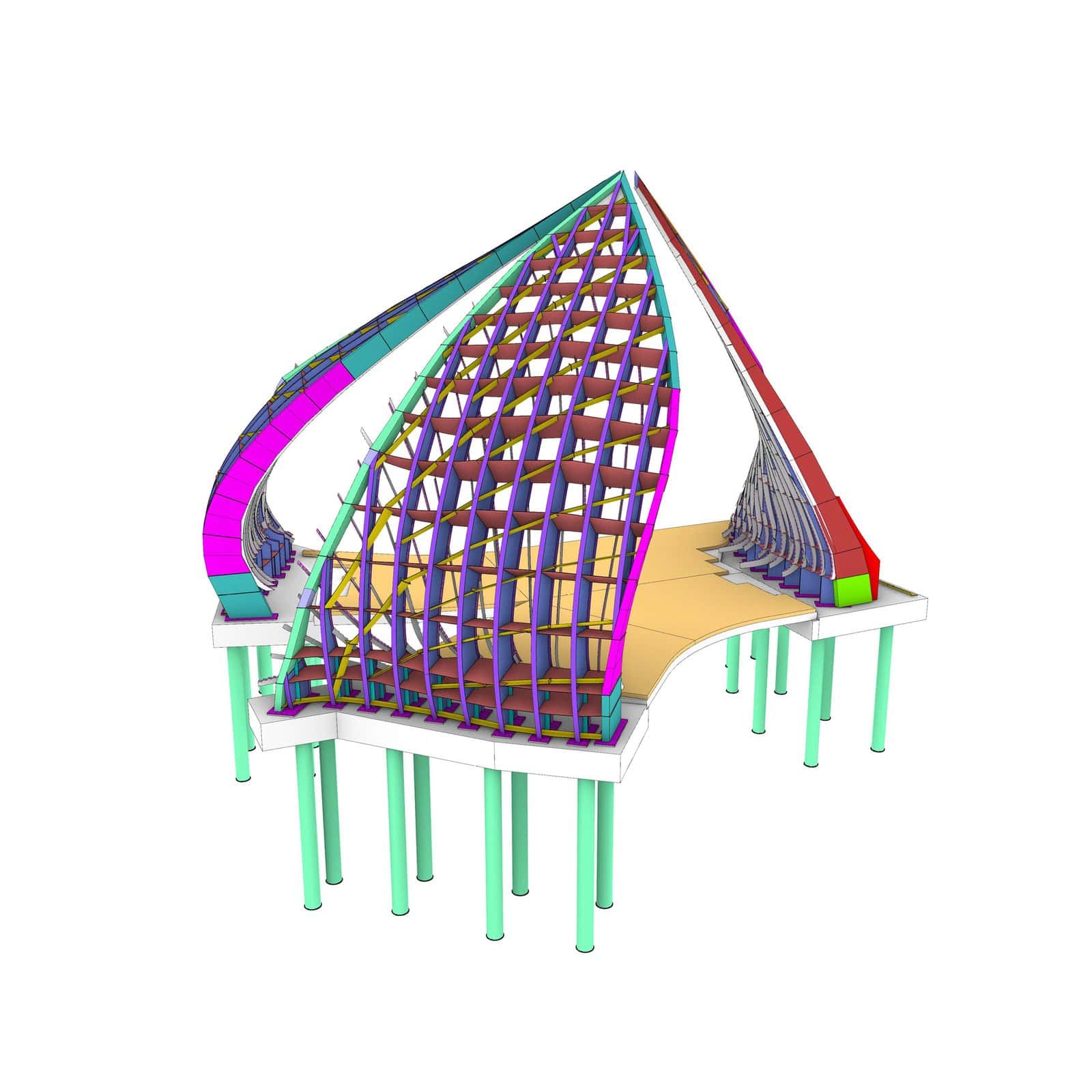
Studio Chris Fox’s Interchange Pavilion, completed in 2020 at South Eveleigh in Sydney with engineers Bollinger + Grohmann, is a twisting canopy of timber and aluminium. The diagram gives every element its own colour: mint green piles, a white base, purple ribs, yellow bracing and magenta and teal edge beams. It reads like a model kit.
- What it shows: The structural system, from foundations to frame to bracing, and how the parts connect.
- When to use it: Expressive structures, timber and steel frames, and technical design subjects.
- Tip: Colour by element type rather than by material, and show the structure on its own with the cladding removed.
14. The Construction Sequence Diagram
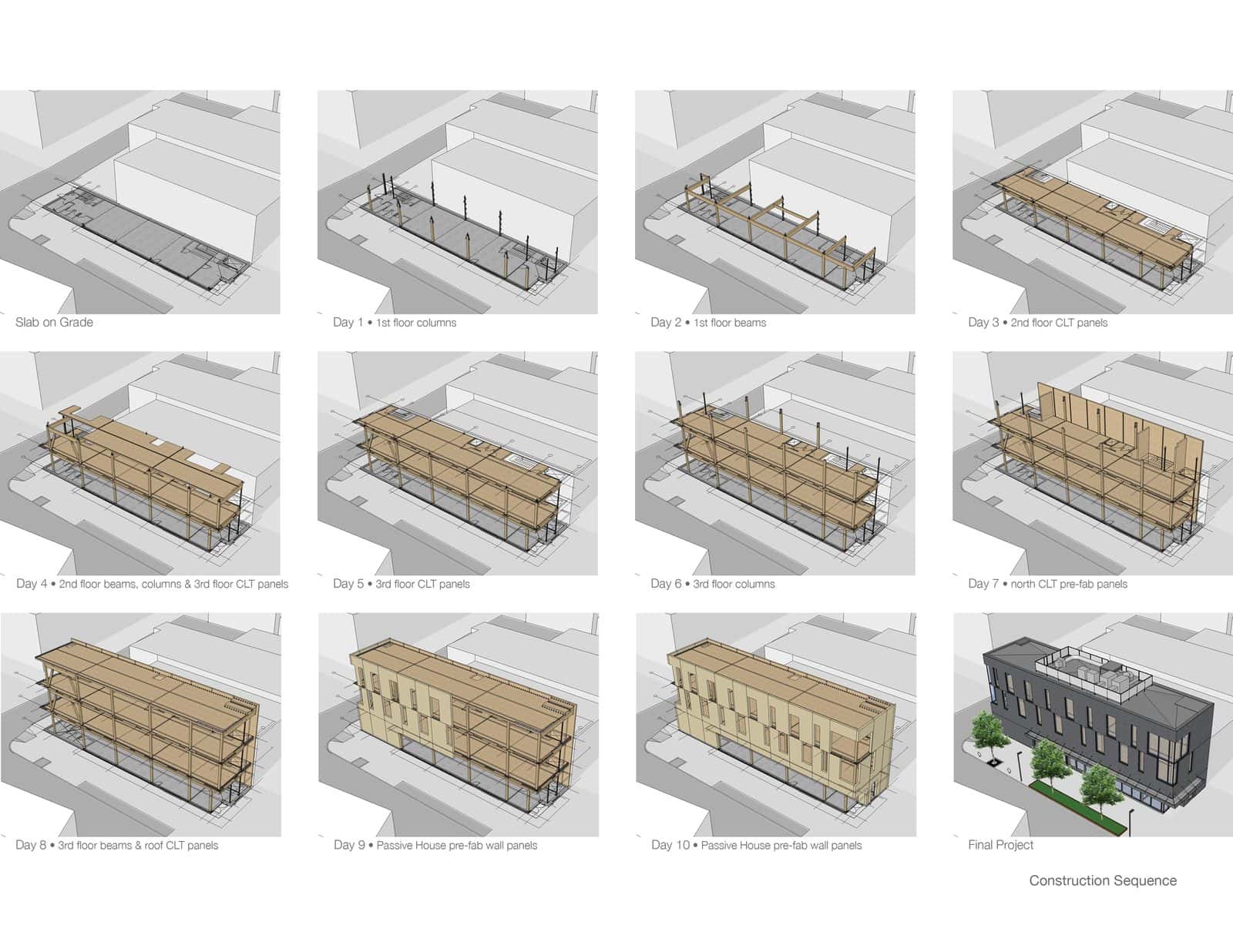
Hemsworth Architecture’s 2021 mass timber building on Lonsdale Avenue, North Vancouver, goes up in twelve small frames. The site on grade comes first, then columns, beams and CLT panels floor by floor, each frame labelled by day, then prefabricated passive house wall panels and the finished dark brick building.
- What it shows: The order of construction or the phases of a project over time.
- When to use it: Prefabricated and timber buildings, staged developments, and any project where how it gets built is part of the design idea.
- Tip: Lay the frames out in a grid with a label under each one, and highlight only the new elements in each frame.
15. The Data Infographic Diagram

Baldasso Cortese Architects summed up the brief for St John the Apostle Primary School in Tarneit, in Melbourne’s west, as icons and big numbers: 194 students, Prep to Year 6, a $4.6 million budget, 15 learning mentors and open, flexible learning pods. The 2014 school is the first stage of a master plan for 450 students.
- What it shows: Numbers, goals and key facts about a project: area, budget, users, energy, carbon or the brief itself.
- When to use it: Opening boards, client reports and competitions, where the audience is not made up of architects.
- Tip: Use a strict grid, one typeface and one accent colour, and only show numbers that support your design argument.
Tips for Clearer Architectural Diagrams
- Start with the argument. Write the one sentence the diagram has to prove, then draw only what proves it.
- Use a limited palette. Keep the building grey or white and save one or two accent colours for the idea.
- Test it small. Shrink the diagram to thumbnail size. If the idea still reads, it will work on a board or a screen.
Architectural Diagram FAQs
What is an architectural diagram?
An architectural diagram is a simplified drawing that explains one aspect of a building or site, such as its concept, programme, circulation, structure or environmental strategy. Unlike plans and sections, it does not need to be fully dimensioned. Its job is to communicate an idea quickly.
What are the main types of architectural diagrams?
Common types include concept sketches, massing diagrams, programme or bubble diagrams, circulation diagrams, site analysis, figure-ground diagrams, solar and ventilation diagrams, structural diagrams, exploded axonometrics, construction sequences and data infographics.
What software is best for architectural diagrams?
Most designers build a simple 3D model in SketchUp, Rhino or Revit, export line work, then add colour, arrows and labels in Illustrator, Photoshop or Affinity. Procreate on an iPad works well for sketchy diagrams drawn over a model view.
How many diagrams should a presentation have?
For a student project, three to six strong diagrams is usually enough: typically a site analysis, a concept or massing sequence, a programme diagram and one or two environmental or structural diagrams. Each one should answer a different question.
Conclusion
Good architectural diagrams are short arguments: one idea, everything else stripped away. Use a site analysis and massing sequence to explain the form, programme and circulation diagrams to explain how it works, and an environmental or structural diagram to show how it performs. Then set them beside your plans, sections and elevations.



Recent Posts
How to Use Textures in Architectural Renders: Where to Find Them and How to Apply Them
Free Architecture Cutouts: Where to Find Them and How to Use Them in Renders
Architectural Diagrams: 15 Styles and Examples for Your Next Presentation